
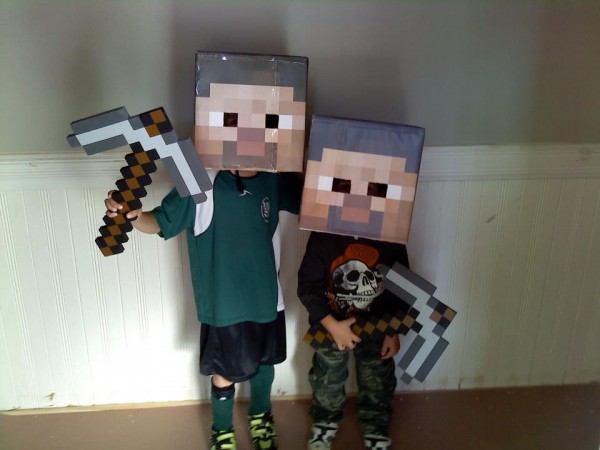
My kids and I are huge fans of Minecraft and my boys decided to dress up like “Steve”, the main character, for Halloween. There are commercially available Steve Heads, but they are rather expensive, and making stuff yourself is fun for kids anyways.
So, we went to Kinko’s and got some of their 11x11x11 boxes (about $2 each) and I made a couple PDF files from the official char.png file you can download from the Minecraft website. We printed these on 11×17″ paper using Adobe Acrobat to handle page tiling. Note that the 11x11x11 boxes are not actually that size – the real size is 11.5″ wide x 12″ tall x 11.5″ deep. These PDFs are scaled to fit that size, with an extra-large hair part to cover the gap on the edges. We just printed out the files, trimmed, and taped onto the boxes, but you can do a lot fancier if you like.
Here are the files: Minecraft Head Files (ZIP)
Please note the following:
- I cannot provide tech support for your printer or computer problems, sorry.
- The only files I have are for the Steve head, and are posted above.
- I do not have any other files for Minecraft stuff (i.e. Creeper head, sword, pickaxe, etc).
Update October 2012: Check out this cool video tutorial on printing your own DIY Minecraft heads using this file!


117 Comments
=D THANK YOU SO MUCH! How do you print it though?
Update August 2012: Adobe Reader has been updated. The main idea is the same, but the interface has changed. Now you need to click the “Poster” button, and then tick the “Tile only large pages” checkbox.
- – - – - -
You should be able to print using Adobe Reader X, which you can download from Adobe’s site here: http://get.adobe.com/reader/
Open the PDF, and select Print, then set the following options under Page Handling:
Page Scaling: Tile Large Pages
Tile Scale: 100%
%Overlap: 0.5 in
Make sure to setup your printer to use the largest paper size you’ve got available, there will be less pieces to put together that way.
Here’s an image of the above:

Awesome! I’m really glad I found this post and I’m trying to print out the face and put it all together,I’ll let you know how it turns out.
Woo! Wore it for spirit week at school. Was epic, thanks for the PDFS!
Stoked to hear that, Dylan! Thanks for the kind words
Wow man thanks! Steve if you didnt post that comment i would have never known what to do. Thanks
My pleasure, glad to be of help.
I’m also glad I found this! thanks for your work putting the pdfs together! This is awesome!!! It’s perfect!
YOU ROCK!
Thank you so much!!! My son loves his costume. I couldn’t have done it without your help.
Thanks again!!!!
As with most parents, I have an 11yr old that is mad mad mad on minecraft!! He is going to his school disco its fancy dress, so it was “Minecraft Steve” here i come…lol I have just completed his head….. it looks AWESOME, thank you very much for your pdf’s, they have made a very tricky craft job for a mum very easy hahahh xx
Thanks for making the your pdf
Work Christmas Party Dress-up here I come!
Hi, Steve,
Your post saved Halloween at our house.Can’t thank you enough.
http://perryvilleparent.blogspot.com/2011/12/thank-you-for-saving-halloween-steve.html
You can put it on a flashdrive, bring it to office depot, and they’ll print it full size with they’re special printer for like 20-25 bucks on a special shiny paper. Looks allot nicer!
Hi Steve
TY so much for sharing
… Used it for my two youngest boys today at fastelavn (a danish kind of Halloween)
Here’s a picture of my boys: http...@N06/6902902505/
My 11 year old celebrated his birthday in Minecraft style in April. These steve heads were a big hit with all 4 of my kids. Thank you for sharing such great instructions! The comment about the pdf file really helped.
Here’s my blog post about the party: Minecraft Party
Muchas gracias por el datos, esta increible.
cool costumes
Did you also make the pick axes? If so, how? If not, did you buy them somewhere?
Patrick we purchased the pickaxes from ThinkGeek.com: http://www.thinkgeek.com/product/e847/
Steve
Steve…thank you for the tips on the pick axes. Can you help me understand the printing though? I went to Kinkos to print the file. I had them do a black and white test first to make sure the size was good…and it was. I had an 11 x 48 sheet that would have been easy to cut and place right on the box. So when I went to order 6 (need 6 heads) I was shocked that they wanted $32 each!!! I see you said 11 x 17…so did you print smaller versions? Please advise…
Yes, I printed them on 11 x 17″ paper, and then had a craft project getting them lined up and pasted on to the boxes. It was easy enough – we just cut out and used tape to apply to the boxes – but yes, getting Kinko’s to print the file on 11 x 48″ is probably quite expensive, and if you can do it elsewhere, or on smaller paper and then assemble, it will almost certainly be more affordable.
Thank you Steve…when I figured out I had to use “tiling” (read above) I was able to get them printed fine.
There is no tile large pages.. it seems updated? Any new instructions? ):
Hi Joel, you’re right, Reader X was updated. Now you need to click the “Poster” button and then tick the checkbox next to “Tile only large pages”… see image below:
EPIC! These will be our Halloween costumes for sure! Thanks so much for posting!!
Steve, these are AWESOME!!! Thanks so much for the printing instructions also. My son is having a Minecraft birthday party, and being able to print these out at home so that 5 boys can create their own Steve head is going to be a fun, affordable party project. THANKS!
Made one for my son’s Minecraft birthday party last weekend – it was a huge hit, and bonus, he wants to be Steve for Halloween! Thanks so much for this!
Thank you so so much!! I will be buying ink so I can print this out. Your instructions were very easy once I downloaded the Adobe Reader X, I just didn’t have enough ink so it looks faded and has tons of lines through it.
My son told me he wanted to be Steve from Minecraft and I thought he was crazy. I didn’t think anything like this would exist so I know my 9 year old will be so happy! I’m excited!! =)
Wow! it an understatement! Thank you so much this was a huge time saver..This couldn’t have been any easier
Thank you so much for the info. This is going to make my 10 year old so happy. We have been search for a Steve Costume for Halloween and the mask are too expensive at $60.00 and up. Thanks again!
Hi Steve,
My son said this morning that he wants to be the guy from Minecraft and after checking Amazon for their prices on the “heads”, I was ready to order him a different costume. Luckily, I came across your site and awesome directions! One quick question though, when I go to print, do I still use the “poster” tab for printing on the normal size printer sheets? I believe 11 3/4 x 8 is the standard measurements. Thanks so much and can’t wait to get some ink and surprise him!!
So glad to find this! My 7yr old requested to be Steve (or Herobrine if possible) for Halloween this year. You’re right, $22 seems a bit steep for a commercial head! Thanks!
I can’t thank you enough. I spent numerous hours trying to accomplish this with my PSE (I am a total novice) before I said there had to be an easier way. Thank you so much for sharing your files!!!!!!!
are the picks the foam ones that cost about $30 ?
could you also add how to make a shirt and pants that look like minecraft guy
That’s correct.. available from ThinkGeek, Jinx, Amazon, etc.
Unfortunately my spare time right now is very limited… but an enterprising soul could follow the same techniques described in my post and, using some basic image editing software, do the same thing I did for the head.
You are SO awesome for posting this! I was just sitting here wondering how in the world I was going to make a Steve Costume for my 9 year old son! Do you have any for Creeper for my other son!?
Thanks for sharing! I’ve made one for my son. His little friend saw it today and I’m now making one from him. For less than $3.00 for the box and tape and spray glue, little mine-craft players are happy!
Does anyone have the updated files for this or is it still possible for the old ones to work? I have an 8 year old who is dying to be steve for halloween. HELP!
Hi i have downloaded the pdf but the tileing option does not appear can you help
Thank you so much for your hard work! Question…How many sheets of 11×17 paper will I need? Can I put this on a flash drive and go make my own copies at Kinkos? I don’t have a wide format printer so I need to go elsewhere to print.
@Cameron: Read the comments above about updating to Adobe Reader X.
@Francesca: You can definitely take this to Kinko’s, and they will be the best ones to tell you how many sheets of paper it will need. It’s possible they can print it all one one sheet, you’ll really just have to ask them. Good luck!
How do you see?? If there is no eye holes, how do you know where your going on Halloween?
Thanks for this!!
There are eyeholes obviously
Thanks for the vid and links to the files–very nice. The boys should appreciate that in about 10 yrs. We’re making a half-Steve, half Creeper-mask. To keep it snug on my 6-yr old’s melon, I’m putting a support in the box like this link has:
http://www.instructables.com/id/Simple-Minecraft-Creeper-costume/
I have printed it out on legal size paper. It worked fine and was printing on 7 pages. On the last page, the paper got jammed and it did not prrint. I can not figure out anyway to just print that last page so I do not have to print the whole thing over. I am almost out of ink. Is there anyway to do this?
I must be missing where to download the pick axes templates, my boys will be so excited!! Thank you for the post, I had a list of paper to buy to cut out little squares to make the heads, so thankful I found this.
can i still use the same template if i need a bigger box?
having issues with the swors and axe- not sure how to print larger than 8 1/2 x 11 and in color after converting to pdf
cool
Took the files to kinko’s tonight but they had an older adobe reader so there was no poster button and we couldn’t get the face image to print out on multiple pages using the 11×17 setting – it only printed on one page which shrunk the image. If we had them print as is (49.50×11.50) it would have been $30 – am I missing a step??
I cant find the printer setting for a mac, it would help if anyone knows them
-Thanks
Thank you so much for posting this. Do you have to use the 11×17 paper for the hair as well or will normal sized paper work? Also, will the 11″x11″ box be large enough for an adult?
We don’t have a kinkos…I went to OfficeMax and I can only find 12x12x12 boxes. That is way too large and also doesn’t fit with the printable. HELP! Any ideas??
I have a mac and a laptop so I saved the pdf file on a flash drive and took it to Fedex Express. I had them follow the adobe instructions and printed it out in large tiles(8.5×11 sheets). I also purchased a 11x11x11 box. I cut out all the pieces and started by taping the face sections together then taped that to the box and finished the hair sections.I used a box cutter for the eyes and purchased navy blue sheer pantyhose which I glued in the inside and had my son use a old helmet to keep it in place. I spent a total of $10 and it looks great. Thanks so much… I went to AC Moore and bought a green tee shirt to finish off the costume. I may spray with the head with a clear coating to make it waterproof. Thanks again
steve, please help! how do i make it so that it fits a 10x10x10 box?
Greg the 11x11x11 box is plenty big enough for anyone. You can use whatever size paper you want – the Adobe software should adjust to work with whatever you want to use.
@flamezor123 & others wanting this to work with a different size box: you’ll have to experiment with the Adobe Reader X software. I think you can specify a percentage to scale the printout, but I have not tested that. If you figure it out, please post so others can benefit.
You have saved my son’s Halloween. Thank you so very much for making this available to everyone online. I appreciate it so very much!
This is fantastic! My minecraft-crazy son is delighted with his homemade steve head, and me, the cash-strapped single mama, is delighted that it cost about $3 to make. So thank you so much for creating this and sharing it.
But now his brother wants a creeper mask…and i can’t find a similar pdf or template anywhere. Does anyone have hints where to find one????
Thanks!
Thank you SO much!! Other tutorials left me confused, but this was easy to download and print. My son is going to be SO excited, I know I am!
Thanks for making my life easier!
Thanks man! You just saved my son and I a bunch of time!!!
YOU ARE AWESOME!! Thanks for making Halloween awesome!!
Took skin from wiki save and open with paint.net copy each piece of head scale to 10 x 10 open in new page save as jpeg or leave as png copy to thumb drive bring to staples ask for color print out on 11×17 glossy paper face rt ear off ear back top five pieces four bucks 2 bucks for box glue stick and clear packing tape to waterproof 2 more bucks
You are awesome! I was able to print the 11″ x 17″ sheets at UPS for .58 cents each with your pdfs it was a total of 7 pages. Kinkos (or Fed Ex now here) was much more expensive like $1.70 each or something like that, but I did get my box at Fed Ex because UPS didn’t have the right size. The box at fed ex with tax for me was $2.45. You made my son’s day and halloween! It was way too expensive to buy from amazon because the jacked up the prices for halloween. It was $89 plus shipping at one time, haven’t looked recently. Thank you thank you thank you!
I can’t seem to find link for teh pick axe… Thank you so much for this, you have made my day and am very excited to do this with my son!
Steve, thank you very much for posting this. You made a 10 year old minecraft addict and his dad VERY happy!
Thanks!
I used a 10x10x8 box and had to just eye ball what to fit together. My 8 year old loves it! Getting ready to find a pick ax to go with it! I just used elmers glue sticks and they worked perfect! Thank You for the file!
There are no files for the pickaxe or sword. My kids are holding the commercial offerings from ThinkGeek.
Thank You Steve!! Our “Steve” head turned out AWESOME! I bought a 10×10 box at Target for around 3 bucks. I used your PDF’s took it on a thumb drive to the UPS store and luckily had an awesome lady there to help me resize it to fit the 10×10 box we have. She was happy to do it even! They printed the entire face on one sheet so no puzzling around with two pieces for the face! The paper is nice semi-shiny paper. They even CUT the white edges off for me! Their service to print on this good paper was 6 bucks. Not too shabby for a Steve head that could have cost upward of 40 bucks commercially to ship to us. I couldn’t be happier with this project!! Can’t wait for my son to see the finished product! He’s going to flip! You rock!!
THANK YOU!!! fantastic job and made my life easier! most inexpensive halloween costume I’ve bought for my boys.
I saw how many questions you received. You were very kind to assist. Found 11 x 11 x 11 at FedEx Office. I tried searching online to save time, but nothing was listed. I was so excited to see the size as standard.
Thanks again!
thanks so much for doing this! All my son wanted to be was Steve this year and we were just getting ready to paint 2×2 squares on a box when we found your site. very helpful and great video! thanks!
Thank you so much it helped
Took the PDF to Fedex Kinkos for the printing/Box. Great instructions, kids are thrilled. Thanks very much for sharing your work.
Made our Steve head today. Thanks so much for your files. It turned out perfect. We pieced it together by getting 11×17 prints which only cost $12 which included the tape, prints and box!! I opted out of using tape though and used adhesive glue instead. Especially since the face will print off in two parts. Thanks again! Made our 10 year old very happy. We’re working on creating the diamond sword now. Happy mining!!! Happy Hallowen!
Thanks a bunch for your initial idea but one of my younger cousins wanted a creeper head too so i got the creeper png out of my minecraft.jar put it in flash of all things traced the bitmap and to make a long story short made mimic files like your steve head with the exception of no stretched pixels for shaping. So good luck with theses files i found that it you printed the wrap around at 225% it was the most similar to the ten page reader format that Steve showed us (too many steves!) so good luck
Creeper wrap around: https://docs.google.com/open?id=0B7j2UbHBwmHbQ1lzaFo3NGlMajg
Creeper top of head:
https://docs.google.com/open?id=0B7j2UbHBwmHbTFdrS1dpMFBubE0
Thank you so much for providing this at no cost! Big fan of homemade costumes and you made my son’s Halloween!!! Well mine too because I’m usually the one who has to make his unique costume requests! We went w the foam sword from think geek and his costume was a BIG hit at Mickey’s Halloween at
Disneyland! Can’t wait till
Halloween night. Can’t thank you
enough!!
http://www.instructables.com/id/Minecraft-Steve-Costume/
link to whole costume and creeper costume links and pick axe link
Mincraft PickAxs
http://www.instructables.com/id/Minecraft-Pickaxe-5-and-45-minutes/
Thanks! Gonna cut the whole eye-ball out and replace it with see-through fabric to make it into Herobrine
And Extra points for still being active a year after posting this!
DD
Thank you for saving Halloween for my son!
my 6 year old’s halloween costume, thank you
Thanks! You are a lifesaver for those who procrastinate! Everything worked out perfectly, even the printing. Hope you and your family have a wonderful Halloween!
This is awesome. I have been procrastinating making my son’s “Steve” costume because I was going to make it using little squares of paper. This just saved me a bunch of time. Thank you!!!
This is awesome! Thank you so much for posting this. It was so simple to print and it looks amazing. My son is thrilled with his halloween costume.
There is a pickaxe DIY at http://www.youtube.com/watch?v=Ye-5E9MVWwE&feature=youtube_gdata_player.
I just wanted to thank you, and offer a tip!!! I made two of these heads; one was a trial.
Instead of glue sticks, use Modge Podge! I went through SO many glue sticks, and the edges still kept coming up in places. With the 2nd head, I was diligent about gluing all around the edges, and gluing the box and the paper before attaching.
I was using the Modge Podge to seal the paper, in case it is raining on Halloween. Then, when I was making the pickaxe, I decided to try using it as the glue for the backside of the pickaxe. I applied it using a 2″ foam brush.
It is WAYYYYY easier, WAAYYY faster, and sticks so much better!!!! It seriously took half the time that the glue sticks did, and with better results. It was my first time ever using Modge Podge, so I truthfully had no idea it was also a glue until I read it on the bottle. LOL I always thought it was used to seal/protect things.
Thank you – this is brilliant! My son is beside himself with excitement.
Thank you so much for this template. It really saved me. Also, for the body I have a box that is just a bit bigger than my son’s body and cut out arm and head holes and opens like a clam shell. I just pulled a t-shirt over it and it’s perfect!
Thanks again.
Sharon
Thank You so much for sharing your craft! My son is turning 8 & loves that he can be Steve for Halloween.
I did the expensive option and had the long sheet printed at Kinko’s since I was short on time & my printer isn’t awesome (my browns were more green).
I did two extra steps once the head was printed & glued. I covered the whole thing in plastic wrap because where I live Halloween is always rainy & I cut ear holes so my son could hear us better. He appreciated that.
The head is large and moves around a lot so for a quick fix I put a kids football helmet underneathe & the box on top, it prevented it from moving around much.
Once I had more time my husband cut up some extra cardboard and put some foam around a head opening so it would do essentially the same thing, prevent slipping and such. You can get the foam inexpensive at a hardware store. We used it to wrap the edges of our glass coffee table when our kids were little, it has adhesive on one side and looks almost like a tube – dark grey.
Thanks again Steve. We really appreciate you sharing!!!
STEP-BY-STEP DIRECTIONS: (CHEAP version, lol!!!) FYI… Whole project cost me under 3 Dollars (I’m estimating my tape cost, because the box was only 67 cents at WalMart,) Estimated time: Took me about 4 hours.
was to use the packing tape to carefully lay strip upon strip across all surfaces, overlapping about 1/4″ and pressing down carefully. I also taped the inside flaps down well.
Materials I used: Home inkjet color printer, regular printer paper, Xacto knife (for cutting out eyes,) and 2 kinds of tape: CLEAR 3/4″ scotch tape (NOT that cheap “invisible” tape,)for attaching artwork to the box, and CLEAR packing tape, for covering and finishing up at the very end to make “waterproof.”
FIRST thing, I bought the box at Walmart. Actually I bought two just in case – since they were so cheap (67 cents.) I couldn’t find the right size mentioned in this website, but I got one that Was 12x12x10.5″ …[the original Minecraft head file from this article worked fine (at first I thought I'd have to scale bigger, but it worked with only a small bit of modification at the end, which i'll explain later.)]
Next I printed out the head to my color inkjet printer at home. I used regular 8.5 x 11 paper. It tiled automatically from Adobe Acrobat Pro to my printer, so again I didn’t need to do anything except hit “print.”
Next I lined the 8 sheets up on my table in order (kinda like a puzzle!), so i could see what needed to go where, and to have them ready when I wanted to attach them. I left them there to “dry” since all that ink makes the paper damp. Will get back to them…
… in the meantime …
Next I prepared the box: I taped the box together since it came flat from the store. I used clear packing tape that I already have at home for taping up packages: (It’s the 2″ clear packing tape.) I was sure to tape it well, making it as stable/solid as i could. The taped/closed side would be the top of my Steve Head.
Next, The open/bottom flaps of the box I folded up and inside the box, figuring this would give the box added stability. (I would tape them well LATER, after I cut the eyes out.)
Now I took the piece of the “puzzle” that had the FACE picture, and carefully cut out the left and bottom edge of it, and positioned it on the left and bottom side of one side of the box (pick any side; I chose one that was very square and smooth.)
Next, using the regular scotch tape (easy to use and quick,) I taped down that first piece in place.
BEFORE cutting out the eyes next … ESTIMATE where the eyes will go through, and TRIM THE INSIDE FLAP under where the eyes will go, so that you don’t have to cut through two layers of box.
SO NEXT, after the flap is trimmed, I taped that flap down on the inside, and the other 3 flaps, too.
NEXT I carefully cut out the eye holes with an Xacto knife (utility knife would have worked fine, too.) I taped down the edges… and from the outside to the inside through the eye holes… being careful to keep the tape flat and smooth. I didn’t tape completely …. just the edges… because I planned to TAPE OVER the entire surface at the end. So again, tape the face in place, tape the eye holes well… and move on.
Next I cut off the white edges of the next piece (going left to right around the box,) lining up the edges and taping the pieces in place. I just trimmed carefully the bottom and left of each piece (to save time,) and just overlap the next piece onto the white edge of the previous one alredy taped to the box.
Eventually I fit all pieces on, taping as necessary. HINT: at one point, the bottom edge seemed to be going down too far, so I stopped and attached the piece to the LEFT of the face, so that any misalignments would end up in the back and not matter so much.
When I had it all on, there was only a vertical strip of uncovered area about 2″ wide in the back (remember, my box was bigger than this website used.) The printout of the TOP of the head can be printed twice for this purpose… for extra dark paper.)
The top row of print outs fit well, with only about 3/4″ left at the top, which I folded onto the top and taped well.
Then I printed out and taped on the “Top of The Head” part.
LAST THING…. and it took a while, too
VOILA!!!! A great Steve Head for CHEAP!
Here is a link to a free pdf Creeper head. It fits a 12 x 12 box…kind of. I used full length labels, cut them to size and it turned out pretty good. Might have to copy and paste the links to get them to work. Free to use. No affiliation with Minecraft:
http://www.diyinvitationtemplates.com/product_downloads/samples/birthday-templates/costumes/creeper.pdf
Hair:
http://www.diyinvitationtemplates.com/product_downloads/samples/birthday-templates/costumes/creeper-hair.pdf
Feel free to post : )
Thank you! This PDF w/instructions; 2 lamp boxes; 1 file storage box; 2 rolls of tape(blk & wht); spray paint; a red rose and my son was ‘Steve’ in his tux skin….Thank you!!!!!!!! The head made ALL the difference…
Your files saved us last night!! My 6th grader didn’t decide until just after school that he wanted to dress up. (He’s at THAT age!) And – of course – he wanted to be something Minecraft-related. I never could have come up with anything at that late notice on my own. I’m so very, very glad you posted those PDF files! They were perfect and came together beautifully! Thank you, thank you!!
We made these for two of my boys for Halloween – they were AWESOME!!! I wish I could post a picture. Thanks so much for providing the file!!!
Thank you so much for the template!! I pulled it into PSE and made each side of the box it’s own file. We had an 8.5″ square box from Amazon so I had to size it down. It worked perfectly!
Thanks so much for the PDF files… My son loved his costume, he said it was his best so far!
this is so cool you rock no doubt about it
This worked wonderfully! Thanks for posting this. My son’s 10th birthday party was a success. I would love to share some pictures with you. I also made creeper t-shirts, diamond swords and had a scavenger hunt. Our party was a success! I made 7 heads! Took me fricken forever but it was fun to do.
It worked really well thank u
How would one do this but with their custom minecraft skin? I tried with paint.net but i couldn’t convert it to a pdf to do this. maybe leave a template of pixels?
Because i need to go to the next minecon in style 8)
Thank you for your help I don’t know how I didn’t discover this till now but it’s awesome I made my own and every one loved it!!!
awesome! thank you
Woah. Thank you SOOOO much!!! One thing; The Steve head skin is outdated. See the dark boat (crafting recipe) shape? That’s not a smile, it’s a goatee, but that was from the older versions of Minecraft. Could you update it to the recent one? (If not, that’s ok)
Thanks
P.S: Gonna wear it for spirit week next year in middle school!
-Ike
my mom is the money kind of person and so i was gonna buy a head sword and pickaxe for $60 but she said no so i am gonna convice her that this is cheaper which it is. Im making a body to go with it but i do still want to buy the sword and pickaxe. I will send a picture of the costume once its done and then comic con awaits me im in free 12 and under im 11 i know omg a girl crafter PEACE!!!!!!
Thank you so much. My youngest game home from school and said, Mum can I have a Minecraft head for school tomorrow. Oh yes easy peasy. You saved my life. tks.
I want to be Steve for Halloween
YAY!
thanks very much goes down well with my grandson
Ho my goodness!!! I just had them printed. This is going to be a surprise for my son. We are having his birthday this weekend and I am excited to tell you that I am coming as Steve and with his minecraft birthday cake. I didn’t liek this this but I am getting now hooked at it, LOL I’ll sahere some videos later. Thank you for your ideas, this is looking great.
Thanks for generously sharing your hard work to make this easy for the rest of us! I easily printed using your instructions, and I’ll be picking up a box tonight. My step-son will love it!!
This is great, thanks so much. My son was adamant on purchasing the Steve head from Jinx.com, no thanks!!
AWESOME!! Thank you so much for posting and sharing this wonderful how to!! For us unimaginative and uncrafty this was perfect!!
4 Trackbacks/Pingbacks
[...] Mom has used lamp boxes to build Creepers and cardboard boxes to create Minecraft Steve Heads with DIY printable skins. From the invitations to the treats she served, she has covered everything with a Minecraft theme. [...]
[...] costume…note the Steve Head from Mine craft – which you can find out how to make here. I attempted to, but did not end up transforming my daughter’s homecoming dress from long to [...]
[...] Minecraft. This was a pretty easy and cheap costume to make. For the head I used the pattern from stevelange.net. The hardest part was cutting all the paper out.An old hat (with the bill cut off) was secured to [...]
[...] link for the PDF files you need is Steve Head Files. Read in the description in the comments on that page for printing [...]
Post a Comment